
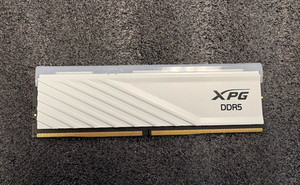

AMD Ryzen 7 7700 · 2-channel
B650 motherboard
- Max memory
- 128 GB
- Theoretical bandwidth
- 96 GB/s
- Motherboard + CPU
- Reference
- $400
- Power supply
- 850 W
- $100
- Reference build price
- $6,195
DDR5 went mainstream in 2021–2022 with Intel's 12th-gen Core and AMD's Ryzen 7000. Desktop sticks usually run at 4800 to 6400 MT/s. A server DDR5 stick (RDIMM) has over 50% more bandwidth than a DDR4-3200 stick, and a single EPYC 9004 has 12 memory channels. That makes it a good fit for MoE models that need several hundred GB.
As an eBay Partner, VRAMGlass may be compensated if you buy through the eBay links on this page. The price you pay stays the same.
As an eBay Partner, VRAMGlass may be compensated if you buy through the eBay links on this page. The price you pay stays the same.
| Spec | Price per stick | Price per GB | Bandwidth per stick | 7-day change | 30-day change | 30-day trend | Buy |
|---|---|---|---|---|---|---|---|
| 16 GB | $59613 listings | $37.3 | 38.4 GB/s | +0.2% | +0.2% | Buy | |
| 16 GB | $61517 listings | $38.4 | 44.8 GB/s | -1.8% | -1.8% | Buy | |
| 32 GB | $1,24425 listings | $38.9 | 38.4 GB/s | 0.0% | 0.0% | Buy | |
| 32 GB | $1,30823 listings | $40.9 | 44.8 GB/s | +1.2% | -1.2% | Buy | |
| 64 GB | $2,50015 listings | $39.1 | 38.4 GB/s | +2.0% | +2.0% | Buy | |
| 64 GB | $2,70013 listings | $42.2 | 44.8 GB/s | 0.0% | +12.5% | Buy |
Price per stick is the median of the latest round of eBay listings; kits are split into single sticks first. Speeds are backward compatible: if a motherboard only supports 4800, a 5600 stick still works and runs at 4800.
Hand-picked deals from trusted eBay sellers. Shop with confidence.
As an eBay Partner, VRAMGlass may be compensated if you buy through the eBay links on this page. The price you pay stays the same.
Hand-picked deals from trusted eBay sellers. Shop with confidence.
As an eBay Partner, VRAMGlass may be compensated if you buy through the eBay links on this page. The price you pay stays the same.
 16GB DDR5-5600 PC5-44800 ECC Registered DIMM AXG102521 Replacement Memory Sam IC$536Buy on eBay
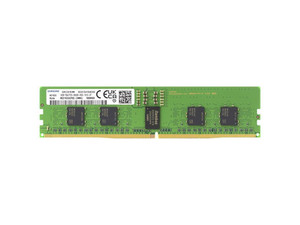 Samsung 16GB PC5-5600B 1Rx8 DDR5 ECC RDIMM Reg Server Memory M321R2GA3PB0-CWM$554Buy on eBay
 Micron MTC20F1045S1RC56BR 32GB DDR5-5600 288-pin ECC Registered Server Memory$1,200Buy on eBay
 Samsung 32GB DDR5 ECC RDIMM PC5-5600B 2Rx8 Server Memory M321R4GA3PB0-CWMXJ$1,275Buy on eBay
In a large MoE model, the expert weights can sit in system RAM while the GPU holds only the attention and shared weights: more RAM fits larger models, and more bandwidth means faster generation. Below are three builds with every memory slot filled, a desktop PC, a single-socket server and a dual-socket server, each with one RTX 4090.
B650 motherboard
Supermicro H13SSL-N motherboard
Gigabyte MZ73-LM0 motherboard
A dual-socket build's theoretical bandwidth is the sum of both CPUs, but generation doesn't get twice as fast. With llama.cpp, MoE models run barely faster on two sockets than on one; KTransformers' dual-socket mode, which keeps a copy of the weights on each CPU, measured about 40% faster. With all four slots filled, many desktop motherboards have to lower the memory speed to stay stable, so real bandwidth is below the theoretical figure.
Reference build price = live eBay median prices for the RAM and GPU + reference prices for the motherboard, CPU and power supply.
Every DDR5 chip has on-die ECC, but it only fixes errors inside the chip. Data leaving the chip and traveling across the stick and motherboard to the CPU is not protected. Real ECC memory adds 8 check bits (marked EC8) or 4 (marked EC4) to each 32-bit subchannel, and every server RDIMM has it. On a desktop, error correction only works if both the CPU and the motherboard support it. You don't need to buy ECC memory specifically to run local LLMs.
Desktops use unbuffered memory (UDIMM); servers use registered memory (RDIMM). An RDIMM has an extra registering clock driver chip (RCD), so each channel can carry more chips. Sticks of 32GB and 64GB are common, and all RDIMMs have ECC. The trade-off is lower speeds and looser timings: server sticks are commonly DDR5-4800 or 5600, desktop sticks 6000 or 6400. DDR5 sticks carry their own power management chip, and desktop and server sticks take different supply voltages, so they are not interchangeable.
The number before R is the rank count. A rank is a group of chips on the stick that are read and written together to make up 64 bits of data: 1R is single-rank, 2R is dual-rank. The number after x is the data width of each chip in bits. It takes 8 x8 chips or 16 x4 chips to make 64 bits, so x4 sticks can reach higher capacities, and most high-capacity server sticks are 2Rx4. The more ranks in a channel, the more likely the motherboard is to lower the memory speed when all slots are filled.
CL (CAS latency) is the number of clock cycles between a read command and the data coming out. Lower is faster. To get the real latency, convert it using the speed: nanoseconds = CL × 2000 ÷ speed in MT/s. DDR5-6000 CL30, common on desktops, works out to 10 ns; DDR5-4800 CL40, common on servers, to about 17 ns. When an LLM runs, every generated token means reading several to tens of GB of weights from memory. Bandwidth is what counts, and timings have very little effect.
Sticks with different speeds will work together, but they all run at the speed of the slowest stick, with the loosest timings. With different capacities, only the capacity that matches on both channels is interleaved in dual-channel mode, so bandwidth drops. Different brands usually work, but the safest choice is the same model from the same batch. Desktop and server sticks can't be mixed, and neither can DDR4 and DDR5 (the notch is in a different place, so they don't fit). With 4 sticks in a DDR5 desktop, most platforms need a big drop in speed to stay stable, so if speed is the goal, use just 2 sticks. On a server, every channel needs identical sticks to reach full bandwidth.
A DDR5 stick is split into two 32-bit subchannels, which together still transfer 64 bits, or 8 bytes, at a time, so bandwidth per stick = speed × 8. DDR5-6000 gives 48 GB/s, which is what PC5-48000 on the label refers to. Platform bandwidth = bandwidth per stick × number of channels. A desktop has only 2 channels, so 4 sticks still give 96 GB/s: extra sticks add capacity, not bandwidth. EPYC 9004 has 12 channels, which reach 460.8 GB/s when all are filled with DDR5-4800.
The number is the speed, and the letter after it is the JEDEC timing grade: DDR5-4800B, common on servers, is CL40, and 5600B is CL46. PC5-38400 is the same speed written as bandwidth (4800 × 8 = 38400 MB/s). An R on the label means RDIMM; U would be a desktop stick and S a laptop stick. EC8 means each subchannel carries 8 ECC check bits. Desktop sticks without this marking only have on-die ECC inside the chips.