GeForce RTX 5070 + Desktop DDR5
Home PCGeneration speed79t/s
Memory bandwidth96GB/s
Reference build price$1,784
Inkling 2 Mini is a 26.4B open-weight multimodal looped MoE released by Thinking Machines in November 2026, with an ~18.7 GB 4-bit file. A single 24GB GPU or an Apple Silicon Mac with 32GB+ RAM can run the 4-bit build, while a 12GB GPU paired with 32GB of system RAM can run it by offloading experts to RAM. Note that the official Ollama package currently only works on Mac, so Windows and Linux PCs need the latest version of llama.cpp.
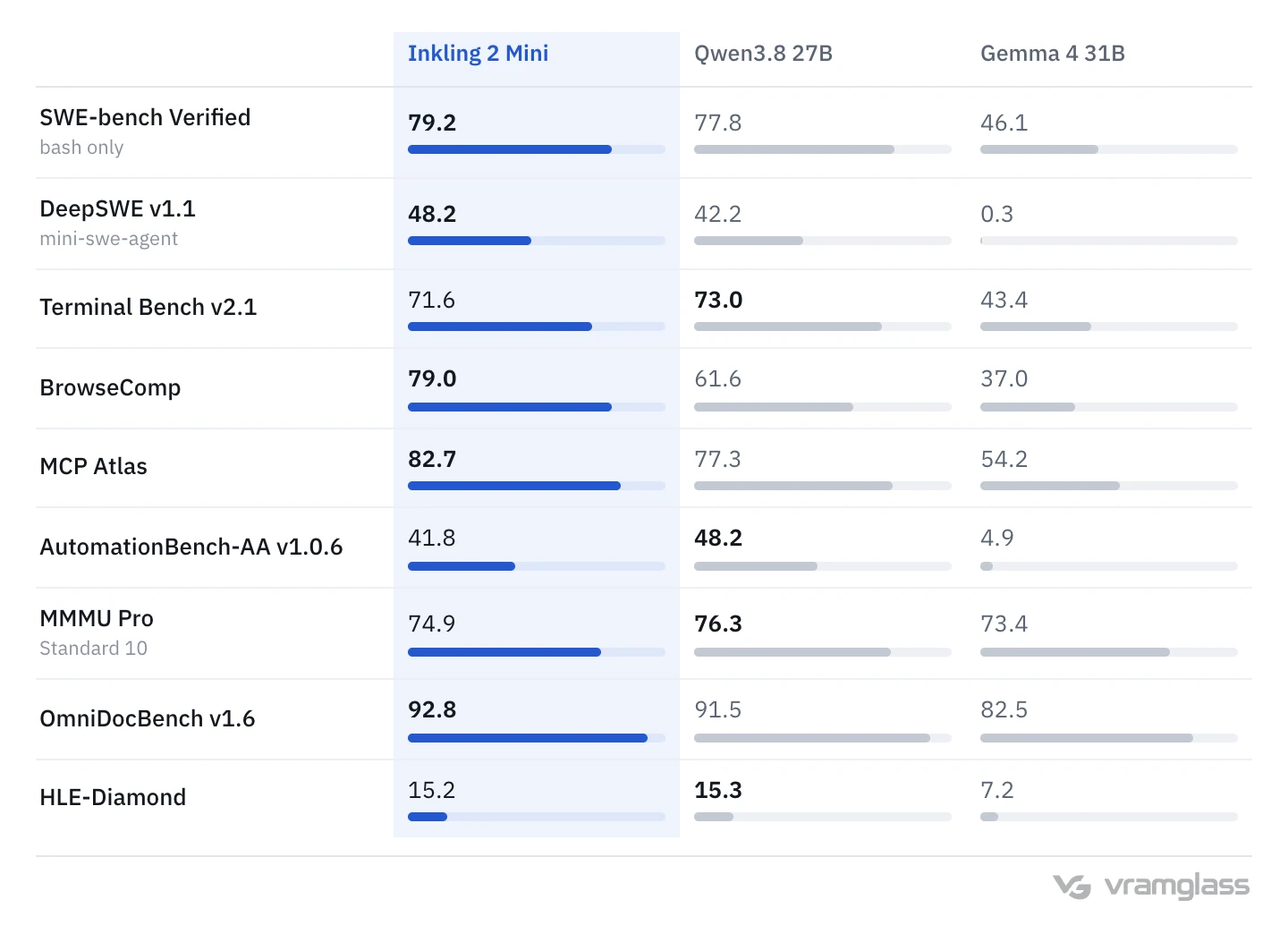
Although it has 26.4B total parameters, its looped architecture only reads about 5.4B parameters per token. Even so, it beats Qwen3.8 27B, a dense model that reads all 27B per token, on coding and agent tasks, while trailing mainly on visual question answering, terminal, and automation tasks. For example, it scores 79.0% on the web search benchmark BrowseComp, well ahead of Qwen3.8 27B at 61.6%, and reaches 48.2% on the coding benchmark DeepSWE compared to 42.2%. However, it only gets 41.8% on AutomationBench and 74.9% on the vision benchmark MMMU Pro, both behind Qwen3.8 27B at 48.2% and 76.3%. Every score in the chart, including Gemma 4 31B, was published by Thinking Machines.
24GB of VRAM is enough to run 4-bit: the 18.7 GB Q4_K_M file in the table plus an 8K context takes about 20.2 GB in total. Its experts were trained natively in 4-bit (NVFP4, with the last 4 layers in 8-bit MXFP8), so the official ~20 GB weights are already at native precision. The 27.8 GB 8-bit and 52.2 GB BF16 files just upcast the original weights without adding accuracy, so there is no reason to download them. Out of its 48 compute layers, only 8 keep the full context while the rest only look at the most recent 1024 tokens. That makes context very memory-efficient, requiring only about 24 GB at 128K context and about 54 GB at the full 1M context.
| Quantization | WeightsGB | 32K contextGB | 128K contextGB | 256K contextGB | 1M context (max)GB |
|---|---|---|---|---|---|
| 1-bit | 8GGUF | 10.3 | 13.5 | 17.8 | 43.6 |
| 2-bit | 11.9GGUF | 14.2 | 17.4 | 21.7 | 47.5 |
| 3-bit | 15.3GGUF | 17.6 | 20.8 | 25.1 | 50.9 |
| 4-bit | 18.7GGUF | 21 | 24.2 | 28.5 | 54.3 |
| 5-bit | 21.2GGUF | 23.5 | 26.7 | 31 | 56.8 |
| 8-bit | 27.8GGUF | 30.1 | 33.3 | 37.6 | 63.4 |
| BF16/FP16 | 52.2GGUF | 54.5 | 57.7 | 62 | 87.8 |
Full calculation rules are on the Methodology page.
A single 24GB GPU can run 4-bit on its own: an RTX 3090 hits an estimated ~97 t/s at 8K context and can fit up to around 170K context. A 16GB GPU cannot fit the 4-bit build and has to drop down to 2-bit, which uses about 14.2 GB at 32K context and runs at around 81 t/s on an RTX 5060 Ti 16GB. Macs with 32GB+ of unified memory and the DGX Spark can also run 4-bit directly, and both the 96GB Mac Studio M5 Ultra and the DGX Spark can handle the full 1M context. Note that the speeds in the table are estimated from memory bandwidth. Because the llama.cpp implementation of the looped architecture is not fully optimized yet, real-world speeds are roughly 60% of those estimates, with community llama.cpp benchmarks on the RTX 3090 coming in at around 57 t/s.
| Device | Price | Speed t/s | Max context |
|---|---|---|---|
 Tesla V100 16GB16 GB | $45413 listings | 117.1 | 120K |
| GeForce RTX 5060 Ti 16GB16 GB | $92058 listings | 80.6 | 120K |
| Tesla V100 32GB32 GB | $1,29815 listings | 117.1 | 632K |
| Radeon RX 7900 XTX24 GB | $1,42024 listings | 120.5 | 376K |
| GeForce RTX 309024 GB | $2,000111 listings | 119.2 | 376K |
| GeForce RTX 409024 GB | $3,69984 listings | 123.1 | 376K |
| Ryzen AI Max+ 395 128GBWhole system · 128 GB | $4,19931 listings | 55 | 1M |
| RTX A600048 GB | $4,97018 listings | 108.7 | 1M |
| Mac Studio M5 Ultra 96GBWhole system · 96 GB | $6,5995 listings | 133.1 | 1M |
| MacBook Pro M5 Max 128GBWhole system · 128 GB | $6,99935 listings | 96.9 | 1M |
| GeForce RTX 509032 GB | $7,000130 listings | 150.9 | 632K |
| DGX Spark 128GBWhole system · 128 GB | $7,99929 listings | 57.6 | 1M |
| RTX PRO 600096 GB | $19,00023 listings | 150.9 | 1M |
| Device | Price | Speed t/s | Max context |
|---|---|---|---|
| Tesla V100 32GB32 GB | $1,29815 listings | 94.8 | 429K |
| Radeon RX 7900 XTX24 GB | $1,42024 listings | 98.2 | 173K |
| GeForce RTX 309024 GB | $2,000111 listings | 96.8 | 173K |
| GeForce RTX 409024 GB | $3,69984 listings | 100.7 | 173K |
| Ryzen AI Max+ 395 128GBWhole system · 128 GB | $4,19931 listings | 39.6 | 1M |
| RTX A600048 GB | $4,97018 listings | 86.5 | 941K |
| Mac Studio M5 Ultra 96GBWhole system · 96 GB | $6,5995 listings | 111.3 | 1M |
| MacBook Pro M5 Max 128GBWhole system · 128 GB | $6,99935 listings | 75.3 | 1M |
| GeForce RTX 509032 GB | $7,000130 listings | 130.9 | 429K |
| DGX Spark 128GBWhole system · 128 GB | $7,99929 listings | 41.7 | 1M |
| RTX PRO 600096 GB | $19,00023 listings | 130.9 | 1M |
| Device | Price | Speed t/s | Max context |
|---|---|---|---|
| Tesla V100 32GB32 GB | $1,29815 listings | 75.5 | 158K |
| Ryzen AI Max+ 395 128GBWhole system · 128 GB | $4,19931 listings | 28.8 | 1M |
| RTX A600048 GB | $4,97018 listings | 67.9 | 670K |
| Mac Studio M5 Ultra 96GBWhole system · 96 GB | $6,5995 listings | 91.2 | 1M |
| MacBook Pro M5 Max 128GBWhole system · 128 GB | $6,99935 listings | 58 | 1M |
| GeForce RTX 509032 GB | $7,000130 listings | 111.2 | 158K |
| DGX Spark 128GBWhole system · 128 GB | $7,99929 listings | 30.4 | 1M |
| RTX PRO 600096 GB | $19,00023 listings | 111.2 | 1M |
Only common GPUs and systems are listed, from cheapest to most expensive.
On desktops with less than 24GB of VRAM, you can use --cpu-moe in llama.cpp to offload the experts to system RAM. In 4-bit, the GPU only needs about 4 GB for the shared weights used on every token, while the remaining ~18 GB of experts sit in system RAM. On a home desktop with a 12GB RTX 5070 and 32GB of DDR5 RAM, 4-bit can keep half of the expert layers in VRAM for an estimated ~39 tokens/s. Switching to 2-bit fits 20 of the 24 layers into VRAM, pushing speeds to around 79 t/s.
Detailed calculation rules are on the Methodology page.
As an eBay Partner, VRAMGlass may be compensated if you buy through the eBay links on this page. The price you pay stays the same.
The official Ollama library already has an ~20 GB inkling-2-mini package, but it is an MLX build that currently only runs on Apple Silicon Macs via ollama run inkling-2-mini. It does not work on Ollama for Windows or Linux, so use llama.cpp on those systems for now.
Most users should stick with bartowski's Q4_K_M file used in the commands on this page, which works on llama.cpp b12600 and newer. If you want to preserve the native NVFP4 expert precision, download UD-Q4_K_XL (~17.6 GB) from the Mainline_Support folder in Unsloth's repo. It requires llama.cpp from November 21 or later, and you need to rename the file extension from .gguf_file to .gguf after downloading; mainline llama.cpp cannot read the files in the root of that repo. For vision inputs, you also need to load the separate ~0.64 GB mmproj file.
There is no pip package for vLLM support yet, so you must use the dedicated Docker image vllm/vllm-openai:inkling-2-mini. The official recipe requires at least 24 GB of VRAM on a single GPU and has been verified on H100, H200, GB200, B300, GB300, and DGX Spark. The weights include a built-in 0.6 GB DSpark draft model, and the default recipe enables speculative decoding with 7 draft tokens per step.
The model has 24 layers of weights and activates only 3.4B parameters in a single pass, but the middle 12 layers loop 3 times per token. That means each token actually goes through 48 layers of computation and reads about 5.4B parameters, making generation speed closer to a model with 5B active parameters. According to official training comparisons, looping lets the model do more work per token and reach answers in fewer tokens; a non-looped version needed 140% more inference compute to match its performance.
The recommended sampling settings are temperature 1.0, top_p 1.0, min_p 0, and no top_k. reasoning_effort defaults to high and accepts values from none to max, or numeric values from 0.0 to 0.99, though even the lowest setting does not completely disable thinking. It is very strong at coding and tool use, with a reported 79.2% on SWE-bench Verified, but it trails Qwen3.8 27B on multi-turn chat and multi-constraint instruction following, and it relies on search and tools to fill in obscure factual trivia.
ollama run inkling-2-mini:26b-a5bllama-server -hf bartowski/thinkingmachines_Inkling-2-Mini-GGUF:Q4_K_M \ -c 8192
Short on VRAM? Add --cpu-moe to keep the routed experts in system RAM (about 18 GB needed).
llama-server -hf bartowski/thinkingmachines_Inkling-2-Mini-GGUF:Q4_K_M \ -c 8192 -ngl 99 --cpu-moe
 vLLM
Follow the deployment guide to prepare the required runtime and hardware.
docker run --gpus all \
  --privileged --ipc=host -p 8000:8000 \
  -v ~/.cache/huggingface:/root/.cache/huggingface \
  vllm/vllm-openai:inkling-2-mini thinkingmachines/Inkling-2-Mini \
    --tensor-parallel-size 1 \
    --reasoning-parser inkling \
    --speculative-config '{"method":"dspark","num_speculative_tokens":7,"draft_sample_method":"probabilistic"}'
File names follow that week's model-library snapshot; the definitions are in the methodology. Methodology