Tesla V100 32GB + Dual Xeon E5 DDR4
BudgetGeneration speed22t/s
Memory bandwidth137GB/s
Reference build price$2,396
 How to Deploy DeepSeek V4.1 Flash Locally
DeepSeek V4.1 Flash is a multimodal MoE released in September 2026. Counting everything in its weight files, it has 763B parameters, more than any single GPU or 128GB machine can hold. The 1017 update that landed on October 17 swaps in new weights only, so the hardware bar hasn't moved. A large share of those parameters is a lookup table called “Engram memory,” which can live in system RAM, so only about 300 GB has to be in VRAM. The official weights run on vLLM. Mainline llama.cpp can't load the community GGUFs yet, but ik_llama.cpp can, with the experts offloaded to system RAM. Ollama only offers a cloud version.
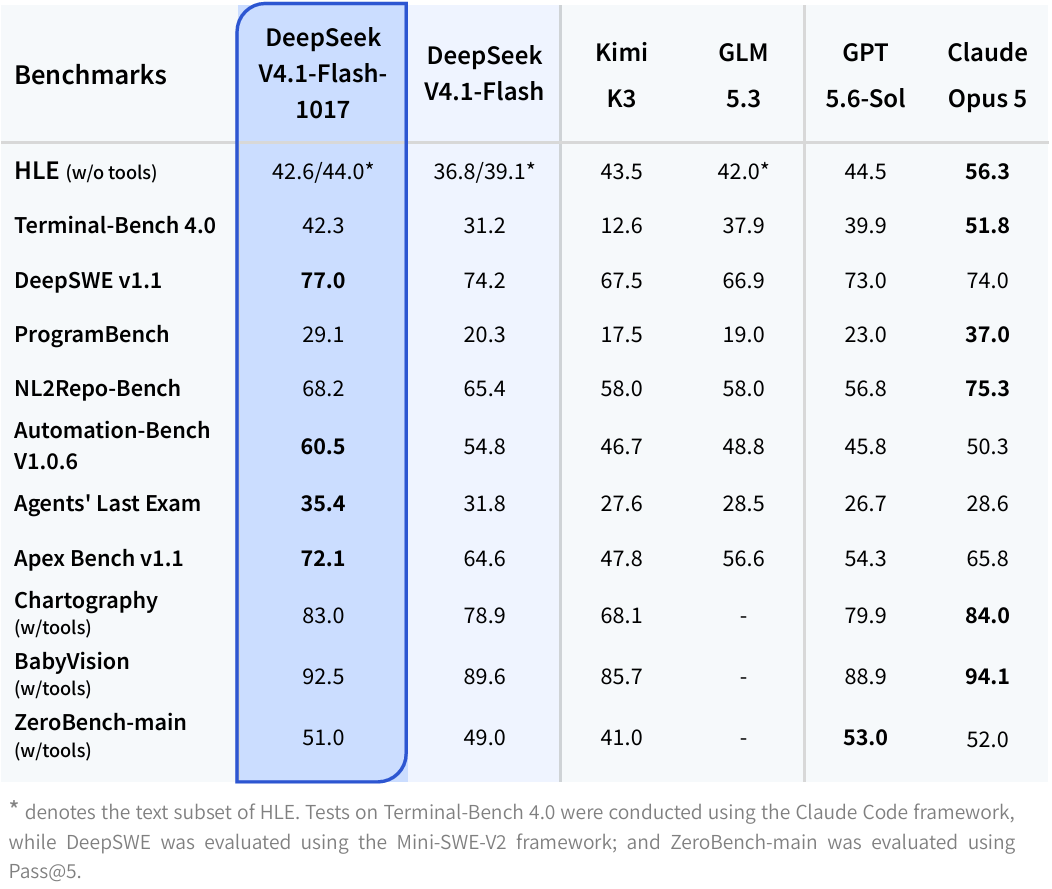
1017 is a weights-only update DeepSeek released on October 17: it scores higher on reasoning, coding, agent and vision benchmarks and gives shorter answers, while the architecture and file sizes match the September launch exactly. The biggest jump in DeepSeek's own results is on Terminal-Bench 4.0, which tests getting work done in a terminal, up from 31.2 to 42.3, and the same tasks now finish faster with fewer tokens. VRAM needs and supported hardware are unchanged; if you already run the September version, just change the model name in your launch command to DeepSeek-V4.1-Flash-1017. NVIDIA hasn't published an NVFP4 build of 1017 yet, so its NVFP4 repo still gives you the September weights.
Model size is shown as 763B to match the official Hugging Face repository. The model card lists 552B backbone parameters and roughly 196B Engram parameters separately. The file sizes below include the GGUF Engram tables and come from complete shard totals, not parameter-count formulas. File sizes are verified; quantization quality and runtime memory use are not.
| Quantization | WeightsGB | 32K contextGB | 128K contextGB | 256K contextGB | 1M context (max)GB |
|---|---|---|---|---|---|
| 1-bit | — | — | — | — | — |
| 2-bit | 264.5GGUF | 265.6 | 265.7 | 265.8 | 266.5 |
| 3-bit | 347.3GGUF | 348.4 | 348.5 | 348.6 | 349.3 |
| 4-bit | 444.7GGUF | 445.8 | 445.9 | 446 | 446.7 |
| 5-bit | — | — | — | — | — |
| 8-bit | 508GGUF | 509.1 | 509.1 | 509.3 | 510 |
| BF16/FP16 | — | — | — | — | — |
Full calculation rules are on the Methodology page.
No, and it isn't close: the biggest single GPU has 96GB, and even 2-bit needs about 266 GB. A large chunk of its parameters is a lookup table that the model reads only a few rows of per token, so that part can live in system RAM, but what's left still needs about 300 GB of VRAM. The only machine with enough memory is the 512GB Mac Studio M3 Ultra, and mainline llama.cpp and Ollama can't load the community GGUFs yet. On a Mac, your only option is DwarfStar's dedicated fork, whose weights are still the September release, so it's far from a sure thing. To run it properly, you have two routes: several 96GB cards with vLLM, or CPU offloading in ik_llama.cpp, which keeps the experts and Engram tables in system RAM, so at 4-bit one 24GB card in a server with 512 GB of RAM is enough.
| Device | Price | Speed t/s | Max context |
|---|---|---|---|
| Mac Studio M3 Ultra 512GBWhole system · 512 GB | $22,80013 listings | — | 1M |
| Device | Price | Speed t/s | Max context |
|---|---|---|---|
| Mac Studio M3 Ultra 512GBWhole system · 512 GB | $22,80013 listings | — | 1M |
| Device | Price | Speed t/s | Max context |
|---|---|---|---|
| Mac Studio M3 Ultra 512GBWhole system · 512 GB | $22,80013 listings | — | 1M |
Only common GPUs and systems are listed, from cheapest to most expensive.
The smallest setup that works is four 96GB RTX PRO 6000 cards running the official weights in vLLM, with the lookup table moved to system RAM: the GPUs hold only the part that has to stay in VRAM, and the host needs about 203 GB of free memory for the rest. That gets you 4-bit at about 68 tokens/s. Eight 48GB cards have the same total VRAM but still fall short, because part of the model has to be copied onto every card, which hurts more the smaller each card is. The official recipe only covers data center hardware like eight H100s or H200s, so this four-card setup is an estimate from capacity and bandwidth; confirm vLLM supports the card first.
| Device | Cards | Total price | Total VRAM | Speed t/s | Total power |
|---|---|---|---|---|---|
| Instinct MI21064 GB per card | 8 cardsEngram in RAM | $40,344 | 512 GB | 64 | 2,400 W |
 RTX PRO 5000 72GB72 GB per card RTX PRO 5000 72GB72 GB per card | 8 cardsEngram in RAM | $85,776 | 576 GB | 55.5 | 2,400 W |
| RTX PRO 600096 GB per card | 4 cardsEngram in RAM | $89,400 | 384 GB | 68.1 | 2,400 W |
| A100 80GB PCIe80 GB per card | 8 cardsEngram in RAM | $168,000 | 640 GB | 71.7 | 2,400 W |
Rows marked “Engram in RAM” need about 203 GB of extra system RAM. Full calculation rules are on the Methodology page.
This route suits anyone with a big-memory server who can't gather several 96GB cards. CPU offloading in ik_llama.cpp keeps the experts and both Engram tables in system RAM and leaves mostly the always-on layers on the GPU, so with a single card a 4-bit build needs about 512 GB of RAM. Each extra card keeps more experts in VRAM and cuts the RAM you need: eight 32GB V100s get by with 256 GB. Mainline llama.cpp can't run it yet, so the speeds below assume ik_llama.cpp.
Detailed calculation rules are on the Methodology page.
As an eBay Partner, VRAMGlass may be compensated if you buy through the eBay links on this page. The price you pay stays the same.
The recipe now asks for vLLM 0.31.0 or newer, and both the pip package and the official Docker image work. The nightly image and the deepseekv41-flash-0909 tag you needed at launch are no longer required. The flag that moves Engram into system RAM is --engram-config '{"cpu_offload":true}'. The first load is very slow, so the recipe sets the readiness timeout to 3600 seconds.
mrfakename has built 2-, 3-, 4- and 8-bit files from the 1017 weights, and their sizes check out. Mainline llama.cpp's V4.1 pull request (PR #28696) still hadn't been merged as of October 18, but ik_llama.cpp merged V4.1 support on September 22, and these files carry the Engram settings its loader reads. The files have no vision part, so they handle text only. To keep the two Engram tables in system RAM, add -ot "engram_embd.weight=CPU".
With no parameters set, thinking is on at strength 50. If max_tokens is too small, the whole output length goes to thinking and the answer comes back empty. Strength takes an integer from 1 to 100, but the level names mean different things in different places: in vLLM, low, high, xhigh and max map to 25, 50, 75 and 100, while in the DeepSeek API, low, high and max map to 50, 75 and 100. The vLLM recipe cites the technical report: a strength of 60 to 80 recovers most of the accuracy with less than half the tokens.
The 1017 model card recommends temperature 1.0, top_p 1.0, and max_tokens of at least 256K. Its context is very light on VRAM: the cache for 1M of context is under 1 GB, so there is little downside to running the full context. For text-only work, add --language-model-only to skip the vision components and leave the VRAM for context.
 vLLM
vLLMFollow the deployment guide to prepare the required runtime and hardware.
docker run --gpus all --privileged --ipc=host -p 8000:8000 \
  -v ~/.cache/huggingface:/root/.cache/huggingface \
  -e VLLM_ENGINE_READY_TIMEOUT_S=3600 -e VLLM_USE_RUST_FRONTEND=1 \
  vllm/vllm-openai:latest deepseek-ai/DeepSeek-V4.1-Flash-1017 \
  --tokenizer-mode deepseek_v41 --tensor-parallel-size 2 \
  --attention-config '{"backend":"FLASHINFER_MLA_SPARSE_DSV41","indexer_kv_dtype":"mxfp4","indexer_sparse_logits":true}' \
  --kv-cache-dtype fp8 --max-num-seqs 128 \
  --engram-config '{"cpu_offload":true}' \
  --tool-call-parser deepseek_v41 --enable-auto-tool-choice \
  --reasoning-parser deepseek_v41 --mm-encoder-tp-mode data
Ollama only has a cloud version, deepseek-v4.1-flash:cloud, which runs on Ollama's servers rather than on your machine.
File names follow that week's model-library snapshot; the definitions are in the methodology. Methodology
| Model | Total params | Active params | 4-bit size |
|---|---|---|---|
| DeepSeek R1 Qwen3 8BDense | 8.2B | 8.2B | 5 GB |
| DeepSeek R1 Distill Qwen 14BDense | 14.8B | 14.8B | 9 GB |
| DeepSeek R1 Distill Qwen 32BDense | 32.8B | 32.8B | 19.9 GB |
| DeepSeek V4 FlashMoE | 284B | 13B | 155.1 GB |
| DeepSeek V3.2MoE | 671B | 37B | 405.4 GB |
| DeepSeek V4 ProMoE | 1,600B | 49B | 849.7 GB |